Deploy Django with Docker (Production Setup – Complete Guide)
A comprehensive guide to deploying a Django application using Docker in a production environment. Learn how to create Dockerfiles, manage environment variables, and set up a reverse proxy for optimal performance.
This guide shows you how to deploy a Django application in production using:
- Docker
- Docker Compose
- Nginx (reverse proxy)
- Gunicorn
By the end, you’ll have a reproducible, production-ready deployment.
⚡ Quick Overview
You will:
Containerize your Django app
- Add Gunicorn
- Configure Docker Compose
- Add Nginx as reverse proxy
- Serve static files correctly
🧠 Architecture Overview
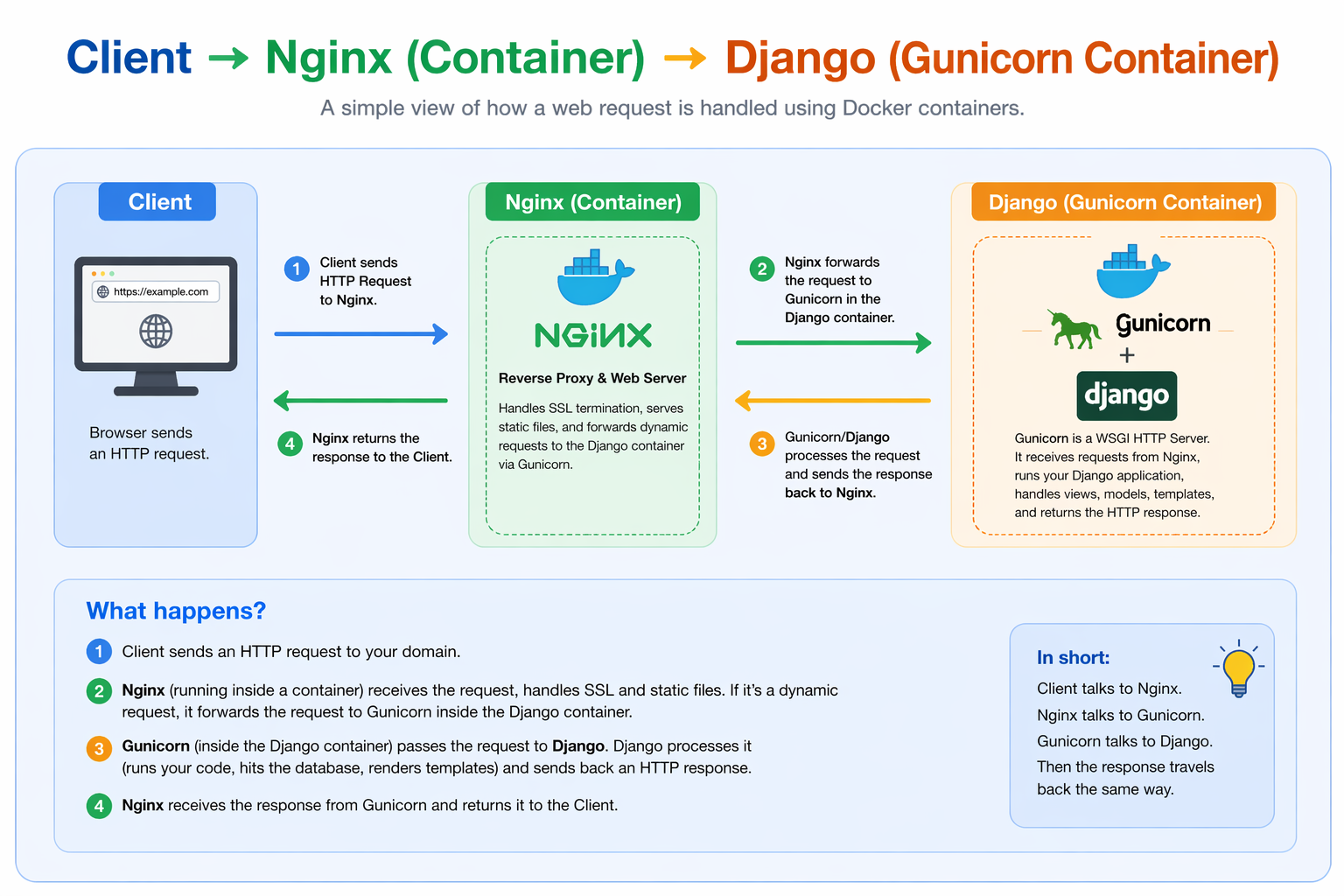
Flow:
Client → Nginx (container) → Django (Gunicorn container)
🧱 Prerequisites
Server (Ubuntu recommended)
- Docker installed
- Docker Compose installed
1. Project Structure
Create:
myproject/
├── app/
├── docker-compose.yml
├── Dockerfile
├── nginx/
│   └── default.conf
└── .env
2. Create Dockerfile
FROM python:3.11-slim
WORKDIR /app
COPY app/ /app/
RUN pip install --no-cache-dir django gunicorn
CMD ["gunicorn", "--bind", "0.0.0.0:8000", "myproject.wsgi:application"]
3. Create docker-compose.yml
version: '3'

services:
  web:
    build: .
    container_name: django_app
    command: gunicorn myproject.wsgi:application --bind 0.0.0.0:8000
    volumes:
      - ./app:/app
      - static_volume:/app/static
    expose:
      - 8000

  nginx:
    image: nginx:latest
    container_name: nginx
    ports:
      - "80:80"
    volumes:
      - ./nginx/default.conf:/etc/nginx/conf.d/default.conf
      - static_volume:/app/static
    depends_on:
      - web

volumes:
  static_volume:
4. Configure Nginx
Create:
nginx/default.conf
Add:
server {
    listen 80;

    location /static/ {
        alias /app/static/;
    }

    location / {
        proxy_pass http://web:8000;
        proxy_set_header Host $host;
        proxy_set_header X-Real-IP $remote_addr;
    }
}
5. Configure Django
In settings.py:
DEBUG = False

ALLOWED_HOSTS = ['your-domain-or-ip']

STATIC_URL = '/static/'
STATIC_ROOT = '/app/static/'
6. Collect Static Files
docker-compose run web python manage.py collectstatic
7. Start Application
docker-compose up --build -d
8. Test Deployment
Open:
http://your-domain-or-ip
👉 Your Django app should now be running
🔥 Common Issues
🔴 Static files not loading
Fix:
docker-compose run web python manage.py collectstatic
Check:
Volume mapping
Nginx alias
🔴 502 Bad Gateway
Check:
docker-compose logs web
docker-compose logs nginx
🔴 Container not starting
docker-compose ps
🔴 Changes not updating
docker-compose up --build -d
🧠 Debugging Tips
View logs
docker-compose logs -f
Restart everything
docker-compose down
docker-compose up --build -d
✅ Production Checklist
Use Nginx + Certbot or a reverse proxy container.
Pair this setup with the base Nginx + Gunicorn deployment guide, then use the production checklist before launch.
🔗 Related Guides
❓ FAQ
What is Docker?
Docker is a platform for developing, shipping, and running applications in containers.
Why use Docker for Django?
- Reproducible environments
- Easier deployments
- Isolation
Do I need Docker in production?
Not required—but highly recommended for consistency.
How do I deploy Django with Docker?
Check out the guide above.
Can I add a database?
Yes—add PostgreSQL as another service in docker-compose.yml.
🎯 Final takeaway
Docker makes Django deployments:
- Repeatable
- Portable
- Easier to manage
If you deploy often…
A pre-configured Docker setup can save hours of setup and debugging.